

Finds all Date fields with either Double Dates, Qualifiers or matching a selected date or date range and returns them as a result set. Before, After To or From Dates can optionally be treated as simple dates. So searching for 1901 will include facts with dates with Before 1901, but not Before 1902.
Family Historian Version(s): V5 V6 V7
Delete all files added by the Load Require option from the Plugins folder in Program Data. Used to prevent older modules being picked up by FH7. If you did not use plugins in FH6 you do not need to install or run this plugin. Once run it can be deleted from your Plugin list.
Family Historian Version(s): V7

This simple plugin deletes the list of recent files under the File > Gedcom File Tasks menu. This can be useful if there are files listed that you no longer use, and is a more convenient option for modern PCs than loading the separate executable utility hosted on the Family Historian User Group site.
Family Historian Version(s): V5 V6 V7

Exports GEDCOM and Media files in GEDCOM 5·5 or GEDCOM 5·5·1 format usually without FH non-standard tags, but with options for many genealogy product dialects. See the Help & Advice pages for further details that include advice on migrating to every product supported. For further support please post in the Family Historian User Group forums or Family Historian at Groups.io email where the plugin author will answer your questions which can be supplemented with screenshots if necessary.
Family Historian Version(s): V5 V6 V7

Simple Fact Calendar created in HTML which shows for the people selected all Births Baptisms Marriages Deaths Burials As normal with the Record selector you can easily use the Add by Query option to select the people you want to include.
Family Historian Version(s): V6 V7
Simple plugin which lists all Births, Baptisms and Marriages, which have anniversaries in the next 7 days, as a result set.
Family Historian Version(s): V5 V6 V7
Finds all Date's with Date Phrases and creates a Result window with them all listed. This would also make a good base to build an automatic correction plugin when importing files from other systems which include non-standard dates.
Family Historian Version(s): V5 V6 V7

Finds all Facts with more than 1 citation to the same source and optionally deletes second and subsequent citations. It is recommended that the list option is used first to allow checking of the items to be deleted, before using the delete option.
Family Historian Version(s): V5 V6 V7
Simple plugin which searches all record types, for duplicate custom Ids, this can be of use when renumbering your records, using the Work With Record Identifier tool, or after merging additional data. N.B It ignores records without custom IDs
Family Historian Version(s): V5 V6 V7

Run this to find Facts of the same type with the same Date and optionally with completely identical sub-fields in any one record. The minimum details that must match are the Fact name, including its Value if an attribute, and the Date. Use the tick options to select which sub-fields to check. The Remove/Enable Ticks button toggles between minimal and maximum checks. For any ticked option, all associated subsidiary fields are also checked, e.g. Source Citation (SOUR) checks that all citations are identical including the Source record, Assessment, Date, Where Within Source, Text From Source, Notes and Media. Click the X Close icon to abort the Plugin. The Find Facts button invokes the search and if any duplicates are found then lists them in a Result Set.
Family Historian Version(s): V6 V7
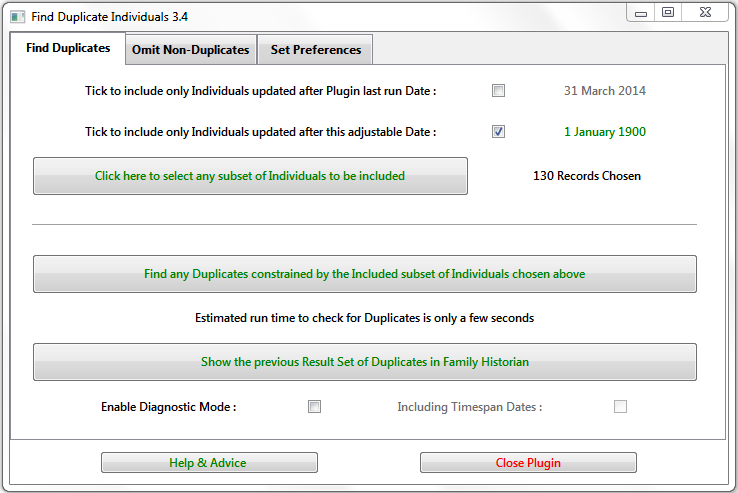
Finds potentially duplicated Individual records by comparing the Names and key Events of selected Individuals and their immediate Relations. See the Help & Advice for details.
Family Historian Version(s): V5 V6 V7

List any Place records whose tidied names would be duplicates and thus should be merged.
Variations due to the placement of commas and spaces, or the case of letters are disregarded.
The duplicate Place records are listed in a Result Set.
 To merge Place records, first select either the Original Record or the Duplicate Record, whichever is the variant to keep.
Use the Edit > Merge/Compare Records... command and select the other Place record before completing the Merge.
To merge Place records, first select either the Original Record or the Duplicate Record, whichever is the variant to keep.
Use the Edit > Merge/Compare Records... command and select the other Place record before completing the Merge.
Family Historian Version(s): V6 V7

List or mend various Date Phrases and unusual Date fields imported from other products. Caters for Ancestry, FTM, PAF, Pedigree, PediTree, RootsMagic, et al. The mended Date fields conform to Family Historian and GEDCOM specified formats.
Family Historian Version(s): V5 V6 V7

Reads a CSV file and creates people, adds facts and creates spouse and parent-child relationships in Family Historian. Columns in the CSV file can be mapped to the appropriate fields using an interface in the plugin - fixed column formatting or naming is not essential. See the online Help for additional advice. The plugin can optionally append a source to every entry, and can create different citation details (i.e. "Where within Source") for each line of the CSV. Within each row, for each individual, it is assumed that any references to a fact type relate to the same occurrence of that fact. Custom references can be used to identify the same individual in different rows of the CSV either to build a more complex tree or to allow for multiple occurrences of a fact type. The type of use intended when creating this was for the import of a variety of data that a one-name or place study might be interested in. For example, baptism transcripts that may include birth and baptism names, parental names and address all in one line. Custom references allow for individuals to be linked across lines of the CSV to create larger family records, e.g. where the same parents had multiple children baptised. This plugin is mostly intended for use in a new Project, but can link to individuals already present in the Project using their Custom Id or Record Id. Please check the import results carefully and report any bugs in the FHUG Plugin Technical Support & Development forum.
Family Historian Version(s): V5 V6 V7

The UniqueID (tag = '_UID') field for an Individual Record in a Family History application is intended to serve as a globally unique identifier for that individual as trees are exported and imported between different applications. Although most applications that support the UniqueID (e.g. Family Historian from version 7, RootsMagic, Legacy, My Family Tree) use the same basic method of calculation, there are a number of different formats in use that limit ready comparison of UniqueID values from different applications. This plugin provides a reversible conversion between the three main formats in common use (with or without checksum, and hyphenated or non-hyphenated).
Family Historian Version(s): V7

This plugin is intended for Projects imported from products such as TMG and Legacy that support Fact Witness Roles, where it may be desirable to remove certain selected Witness Roles from Facts and create separate Facts for the Witness Individuals instead. The most common case is Census Witnesses, where separate Individual Census Events with a common Source Citation are better supported, as explained in the FHUG Knowledge Base Recording from a Census Record article. All the details of the principal Fact are replicated in each witness's own Fact except for any Age or specific Sentence Template. The witness Role is added as a labelled Note optionally enclosed in [[privacy]] brackets. After removing the Witnesses of Census (family) Events consider using the Migrate Census Family to Individual Events plugin. Before running the plugin, ensure there is a suitable backup in case the changes are unsatisfactory.
Family Historian Version(s): V6 V7